What if you want to migrate an existing network to an NSX-T overlay segment, only to find that there are not only VMs utilizing this network, but also physical servers? A potential solution is to change the IP addresses of either the VMs or the physical servers, but the potential disruption of doing so may make this choice unattractive in your environment.
For these situations, NSX-T offers bridging. A bridge in NSX-T joins a VLAN to a given overlay segment. The result is that the VMs that are attached to the NSX-T segment are still in the same layer 2 (L2) domain as the physical servers that are attached to the associated VLAN.
An NSX-T Bridging Example
In the graphic below, we find a VM attached to an NSX-T segment and a physical server attached to VLAN 100. The segment and VLAN 100 are joined via an NSX-T Edge node which is performing bridging. The IP network in use is the same on each side of the bridge (in this example, it’s 192.168.10.0/24). This means that when the physical server (192.168.10.10/24) wishes to communicate with the VM (192.168.10.20/24) on the bridged segment, it sends an ARP request for the VM’s MAC address, just as it would if the VM resided directly on the VLAN.
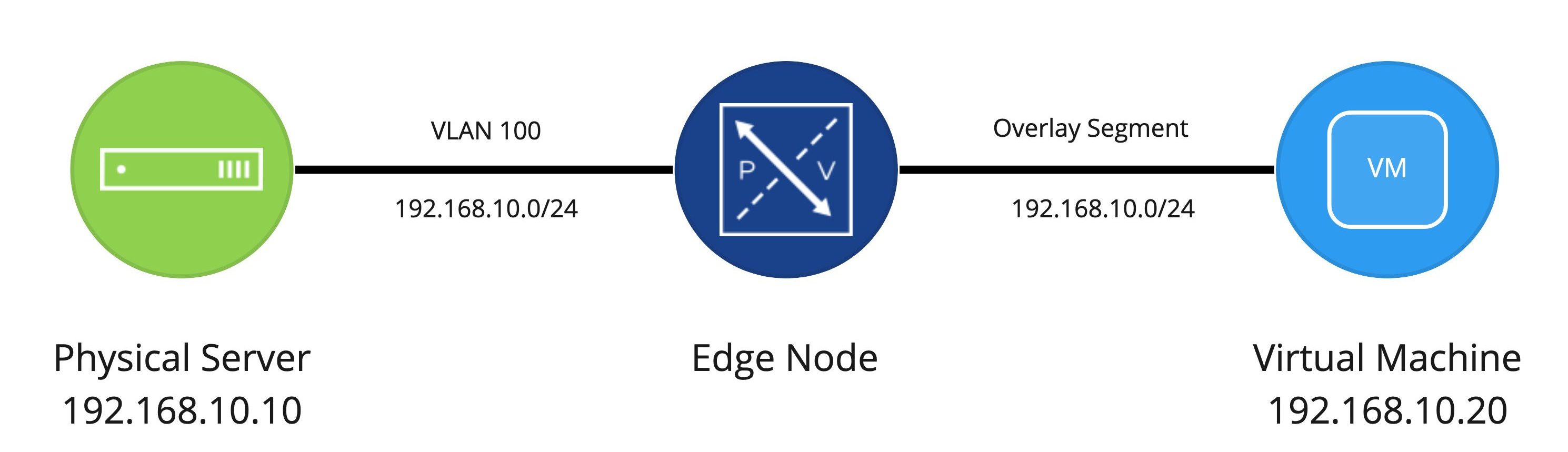
A point worth noting here is that while bridging is typically depicted as a virtual machine on a segment and a physical server on a VLAN, there are other common instances where bridging is utilized:
- Some VMs reside on vSphere hosts that are not NSX-T prepped, while others do – In this case, we can still bridge a segment and a VLAN; the only difference from the diagram above is you have VMs on each side of the bridge instead of a physical server and VM.
- VMs cannot migrate from a VLAN port group to an NSX-T segment at the same time as the gateway – If there is a concern about changing layer 2 (VLAN port group to NSX-T segment) and layer 3 (layer 3 physical device to an NSX T0/T1) at the same time, bridging can allow you to move VMs to an NSX-T overlay segment while continuing to use the physical router as their gateway. When you are ready to migrate the gateway itself, simply attach the existing NSX-T segment to a T0/T1, and remove the gateway from the physical network.
We might dive into more of these scenarios in the future, but the above are not the sole scenarios where bridging in NSX-T can be utilized.
NSX-T Edge Node VM Bridging Considerations
Bridging in NSX-T can be performed on both bare metal Edge Nodes as well as Edge Node VMs. In most situations, people will elect to utilize Edge Node VMs due to the ease of deployment . As such, we will be evaluating NSX-T bridging utilizing NSX-T Edge Node VMs.
Before you create a bridge in NSX-T there are two items that you must consider:
- “Where does my NSX-T Edge Node(s) reside?”
- “How do I configure the VLAN side of the bridge?”
Where does my Edge Node VM reside?
Unlike the ESG in NSX-v, an Edge Node in NSX-T can reside anywhere in your vSphere environment. Can I put my Edge Node ….
- On an NSX-T prepared host? Yes.
- On a vSphere host that has not been NSX-T prepared? Yes.
- On a vSphere host that isn’t managed by vCenter? Yes.
- On a host managed by a different vCenter than the hosts where work workloads reside on NSX-T segments? Yes.
As you can see, you have a lot of flexibility in regards to where an NSX-T Edge Node VM may be deployed. This flexibility is due to the fact that the Edge Node VM itself has it’s own TEP(s) for participating in overlay networking. This means that the underlying vSphere host where the Edge Node VM resides does not have to be prepared with NSX-T VIBs.
For now, let’s focus on Edge Node deployment on:
- Any vSphere host using a VSS/VDS, including vSphere 7.0+ host that are NSX-T 3.0+ prepped
- An NSX-T 2.4+ prepared host that is utilizing the N-VDS
Option 1 means we have access to a VSS/VDS and the Edge Node VM will attach to port groups. The reason for specifically calling out ‘including hosts that are vSphere 7.0+ and NSX-T 3.0+’ is, beginning with vSphere 7.0 and NSX-T 3.0, you can use these products together and continue utilizing the VDS. Prior to this combination, in order to deploy segments or prep hosts you were forced to use the N-VDS, which was a virtual distributed switch owned and managed by NSX.
To cover our bases here, if you have any version of vSphere before 7.0 (including and up to 6.7) and you are using any version of NSX-T, then your vSphere hosts must be utilizing an N-VDS for workload traffic. If you are on any version of vSphere (including 7.0+) and you are using any version of NSX-T prior to 3.0, then your vSphere hosts must be utilizing an N-VDS for workload traffic.
So, to reiterate, option 1 means either A) we have a vSphere host with no NSX-T installed at all or B) it’s a vSphere 7.0+ host with NSX-T 3.0+, and we are using the VDS rather than the N-VDS. Also, as a fun aside, option 1 also covers a vSphere host that has NSX-v installed on it. Yep, you can even deploy an Edge Node VM there as well!
Option 2 is just what it says it is: this is for a situation where you need to bridge and your Edge Node VM resides on a host that is NSX-T prepared and is using an N-VDS. For the most part, you’ll only find this in situations where NSX-T was installed prior to 3.0 being released or perhaps NSX-T 3.0+ was installed, but for whatever reason, the vSphere installation could not first be upgraded to 7.0+.
How do I configure the VLAN side of the bridge?
In Part Two, we will review the options and configurations required for supporting bridging on the VLAN side of the equation. See you then!
 LumberjackWizard